Yes, you can. I still recommend fictional data. On every course I teach, participants work in a fictional company or municipality. On a company course, I build that fictional version around your own templates and tasks. The exercises look like your daily work, and nobody has to bring in real case files.
I teach Copilot to municipalities and companies, and the question "Can we use our own data?" comes up in almost every planning meeting. This is my answer, how I build the fictional cases, and when your own data can make sense.
What a fictional case looks like
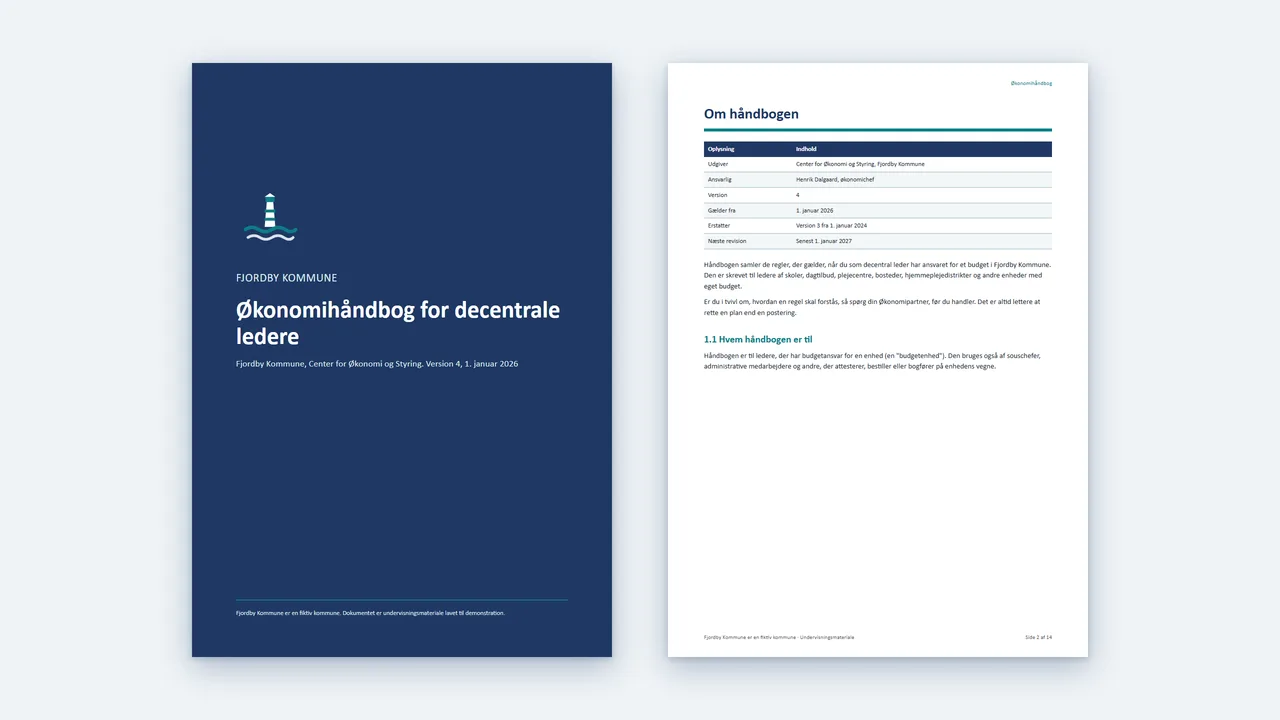
My fictional municipality is called Fjordby Kommune, a Danish municipality with 61,400 residents, a council of 25 members and four departments. It has memos, committee papers, handbooks and Excel sheets like the ones municipal staff work with every day. Every employee and manager in the files is invented.
Every file is clearly marked as coming from a fictional municipality. There are no email addresses, no real domains and no postcodes, because an invented postcode can easily point to a real town. Residents appear only as numbers or anonymous case IDs.
My standard courses follow the same principle with other cases. The Copilot Chat course uses a fictional coffee company. On the Copilot Studio course, participants build an agent for the IT helpdesk of a fictional engineering firm.
Three reasons fictional data works better
No personal data
The files contain no information about real people. Participants can upload them, share their screens and work in groups without worrying about personal data. They can also take the files home and keep practising after the course.
Errors I planted myself
This is the most important reason. In a fictional municipality, I can plant errors on purpose: A colour-coded overview where some rows have the wrong colour. An answer that covers the wrong year. An amount in the text that does not match the table. I have the answer key, so we can check whether Copilot found them all.
At least one file has no errors at all. It is there as a control: The participants' checklist should find nothing in it. If Copilot still reports errors, we have a real example to discuss while participants learn to check Copilot's answers.
With real data, nobody has the answer key. If Copilot finds no errors, you cannot tell whether there are any.
No confusion with your real figures
If you work with your real figures, a practice number can end up in a real document. A figure from Fjordby cannot be mistaken for one of yours. The exercise also stays clear of debates about your own finances or a specific case, so the time is spent on the method.
How I build the case
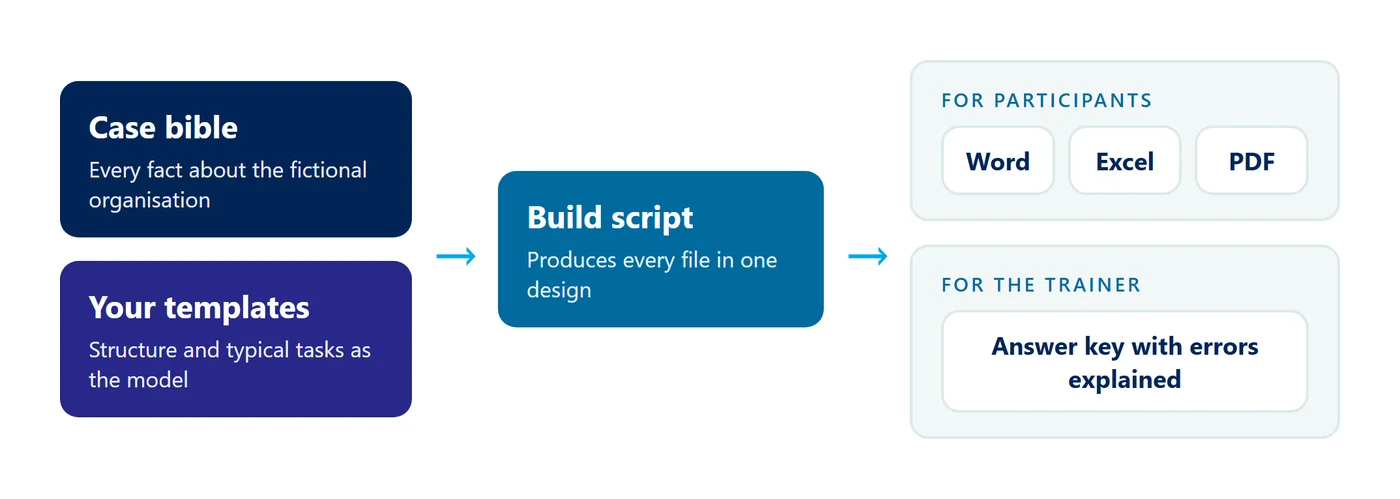
- A case bible. One document with every fact about the fictional organisation: Population, departments, people, key figures and rules. If a file disagrees with the bible, the file is wrong, except for the errors I planted on purpose.
- Your material as the model. For a company course, I ask for examples of your templates, case types and typical tasks. The fictional version follows the same structure, so the exercises look like your daily work.
- Errors with an answer key. Every planted error is listed with an explanation in a file for the trainer, so we can go through them together afterwards.
- One design and one build script. A single script produces every Word, Excel and PDF file. They share one logo, font and layout, so they look like documents from a single organisation.
Is Copilot secure enough for our own data?
With a work account, Copilot Chat is covered by Microsoft's enterprise data protection. Prompts and responses are not used to train foundation models, and your access permissions also apply in Copilot. The exact controls depend on your subscription. That makes it a sound basis for using Copilot in real work.
Enterprise data protection only covers how Microsoft handles your data. On a course, participants share screens, work in groups and put files in a shared folder. Real cases can end up in front of colleagues who should not see them, and the files can stay there after the course.
The strongest argument for your own data
Some participants prefer working on their own tasks. I understand why: It feels more relevant, and they can use the result straight away. We can build a course on your own data if you want to. It takes more preparation:
- Clean-up: Every file has to be checked for personal and confidential information before it can be used on a course.
- Different access: Participants do not have access to the same files, which makes a shared exercise hard to run.
- No answer key: Nobody knows which errors are hiding in the files, so you cannot tell whether Copilot found them.
- Focus shifts to content: Real cases pull the discussion towards the case itself, and the method takes second place.
Fictional data has a cost too. A good case takes time to build, and a thin case feels like a toy. If the exercises are too far removed from their daily work, participants cannot see how they will use them. That is why I build the case from your own material when the course is tailored.
My recommendation: Learn the method on a fictional case
Start with a fictional case that looks as much like your daily work as possible. Once participants have tried the method on files with a known answer key, they can apply it to their own tasks at their own pace and with the permissions they already have. If you want your own tasks on the course itself, put them at the end of the day and choose tasks without personal data.
Read Microsoft's description of enterprise data protection here: Enterprise data protection in Microsoft Copilot and Microsoft Copilot Chat.
Our company courses page shows which courses we can tailor, so the exercises are built on your own templates and tasks.