Claude in Microsoft 365 Copilot is now available in Copilot Chat, in Researcher, when you edit in Word, Excel and PowerPoint, and in Cowork and Code. At the same time, Microsoft has announced that on December 9, 2026, it will turn Claude on for all users in EU tenants that are eligible for the EU Data Boundary and have not made a choice themselves. This article shows what Claude can do in Copilot, what it means for your data, and step by step how to control it in the Microsoft 365 admin center.
Where to find Claude in Copilot
You can choose Claude in most Copilot experiences:
- Copilot Chat: Claude Sonnet 5, Sonnet 5.5 and Opus 5.5.
- Researcher: Claude on its own, or two modes where GPT and Claude work together.
- Word, Excel and PowerPoint: Claude in the Copilot pane while you edit, and in the Word, Excel and PowerPoint agents in the Copilot app.
- Cowork and Code: Opus 5.5, Sonnet 5.5 and Fable 5.2. Microsoft announced Fable 5.2 for Cowork and Copilot Studio on November 11.
- Copilot Studio: Claude as the model in your own agents, once an admin has also allowed it in Power Platform.
Version numbers change often. Microsoft itself says that not every model upgrade gets an announcement, so what you see may be newer than what is written here.
Copilot Chat: Choose Claude in the model picker
- Open Microsoft 365 Copilot.
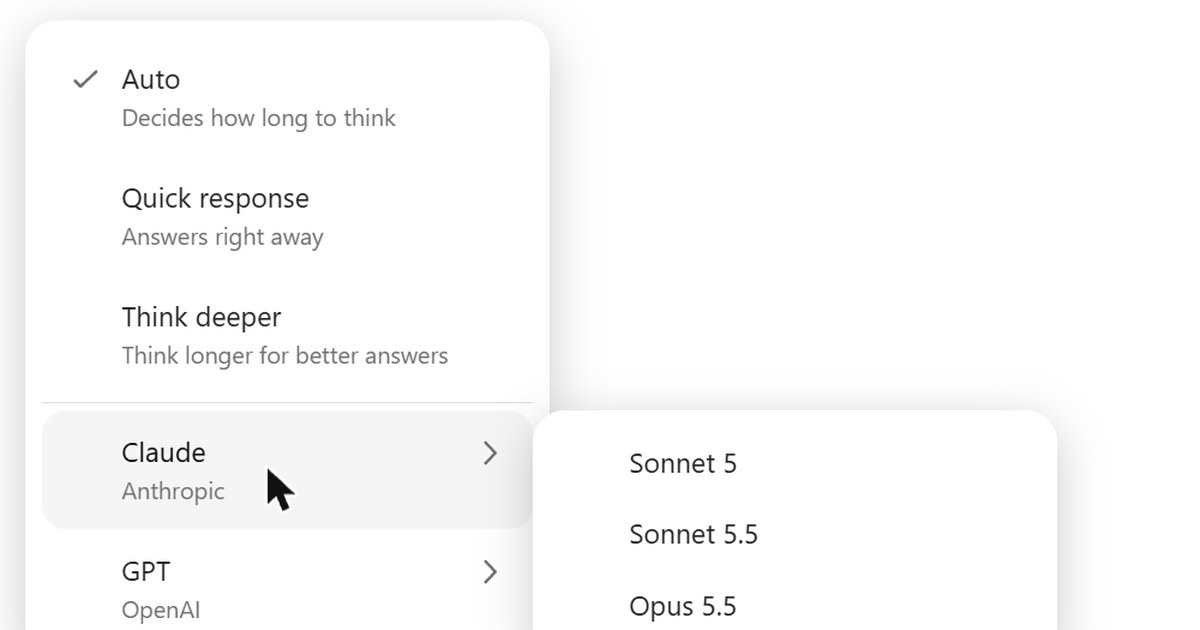
- Click "Auto" at the top of the chat.
- Point to "Claude", and choose Sonnet 5, Sonnet 5.5 or Opus 5.5.
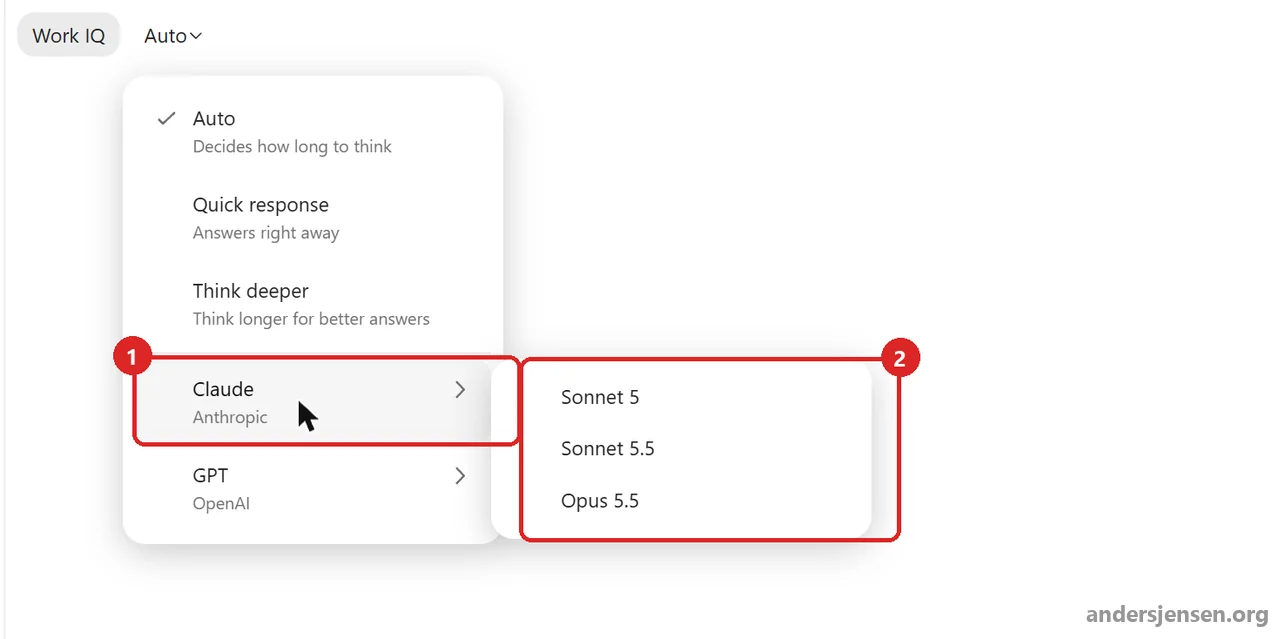
At the top of the menu are Microsoft's own modes: "Auto", which decides how long to think, "Quick response" and "Think deeper". Below them are the model families Claude and GPT. When you choose a Claude model, the button at the top shows the model's name.
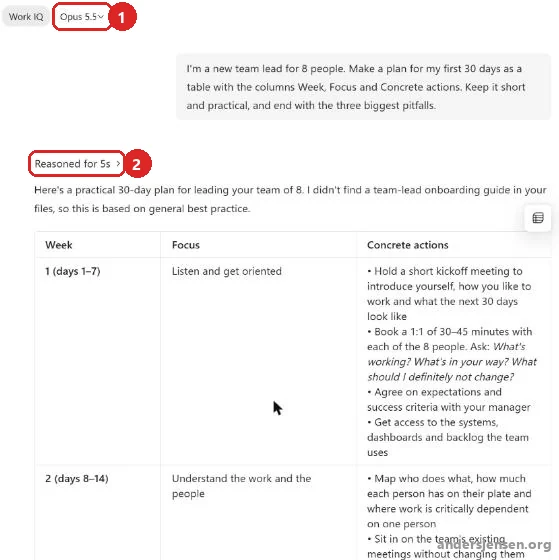
The answer above is from Opus 5.5. The "Reasoned for" line above it shows how long the model reasoned before it answered. And the answer is still Copilot: Copilot says it found no internal onboarding material for managers, so the plan builds on general good practice.
Researcher: Let Claude and GPT work together
Researcher is where Microsoft has gone furthest in mixing the models. The picker at the top has four modes:
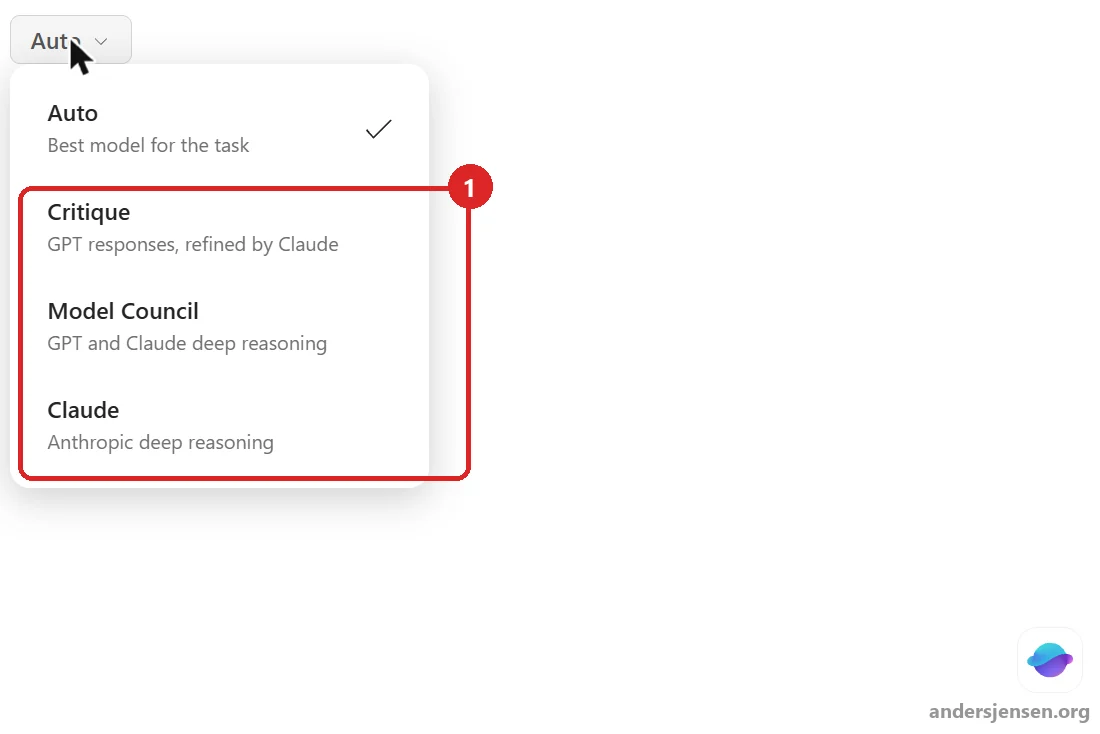
- Auto: Researcher picks the best model for the task.
- Critique: GPT writes the answer, and Claude refines it afterwards.
- Model Council: GPT and Claude reason side by side.
- Claude: Only Anthropic's model, from start to finish.
According to Microsoft's guide to model choice in Researcher, Auto and Model Council require your organisation to be in the Frontier programme. The page has no date, though, so check what your own users see.
Word, Excel and PowerPoint: Claude while you edit
When you edit with Copilot in the Office apps, you can choose Claude too. In Word it looks like this:
- Open a document in Word, and click the Copilot icon in the top right corner.
- Click "Auto" at the top of the Copilot pane.
- Expand "Claude", and choose Sonnet 5.5 or Opus 5.5.
- Type what you want in the "Edit with Copilot" box.
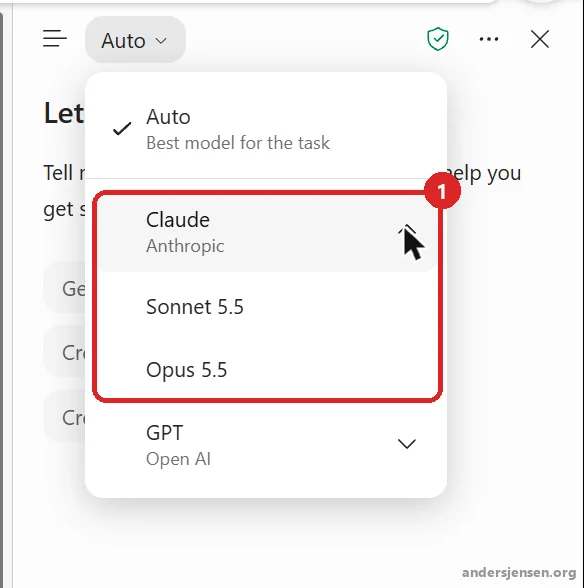
We asked Opus 5.5 for an agenda for a one-hour team meeting. Copilot wrote it straight into the document and summarised what it had done in the pane.
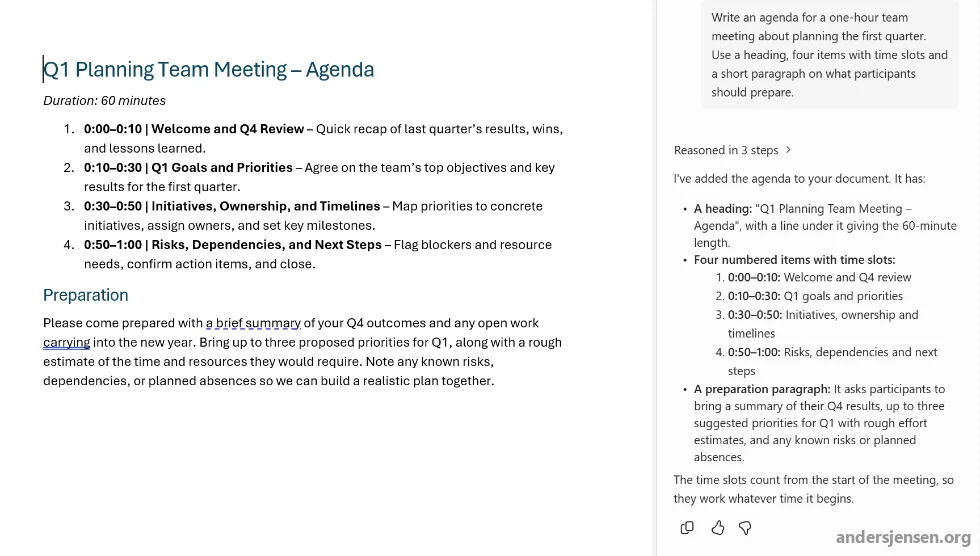
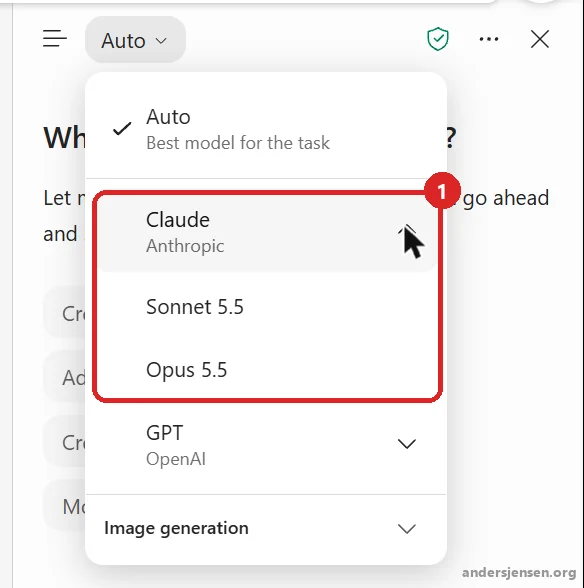
PowerPoint has the same picker in the Copilot pane, with Sonnet 5.5 and Opus 5.5 under Claude:
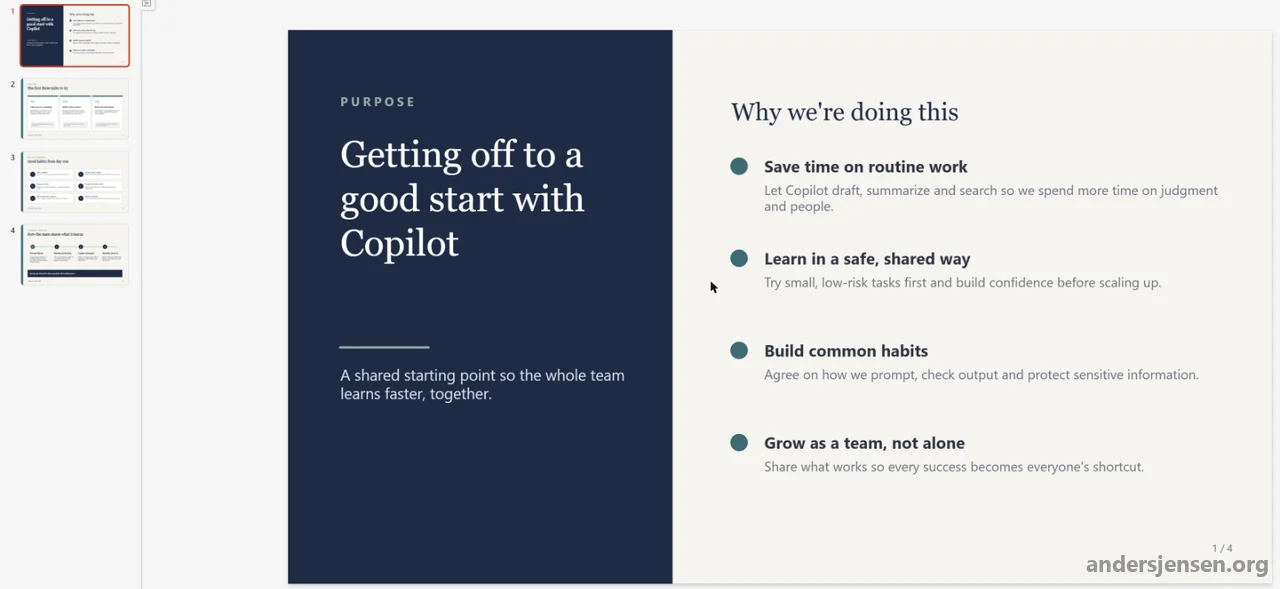
We asked Opus 5.5 for four slides on how a team gets off to a good start with Copilot. Copilot created four slides with a simple, consistent design and no photos.
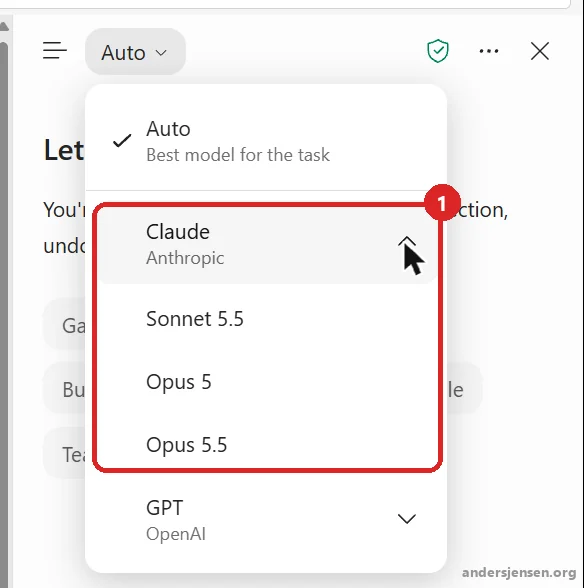
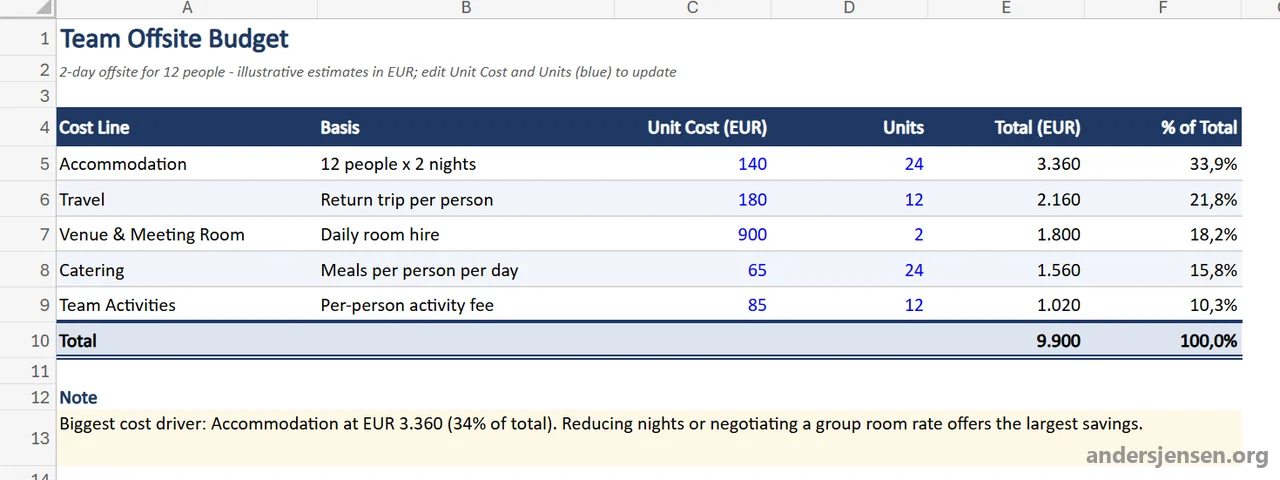
In Excel, the model picker sits in the top left corner of the Copilot pane. Here, Claude also offers Opus 5 alongside Sonnet 5.5 and Opus 5.5:
We asked Opus 5.5 for a small budget for a team offsite. It built a formatted table with five cost lines, a total row and a note on the biggest cost driver.
Two things are worth knowing for all three apps:
- The choice only lasts for the current session. That is stated in Microsoft's guides to model choice in Word, Excel and PowerPoint. The next session starts on Auto or the default model.
- The Word, Excel and PowerPoint agents in the Copilot app are not the same as Copilot inside the apps. According to Microsoft's page on the agents, at the time of writing they use only Anthropic's models and become unavailable if you turn Anthropic off, even for licensed users. Copilot inside Word, Excel and PowerPoint can still use GPT.
Cowork and Code: Where Fable 5.2 lives
Cowork is Copilot's agent that carries out tasks for you across mail, files and apps. The Code tab opens with a "Create anything" box and suggestions such as "Visualize my week and focus time", and at the time of writing it is part of the Frontier programme. In both places you can choose between three Claude models:
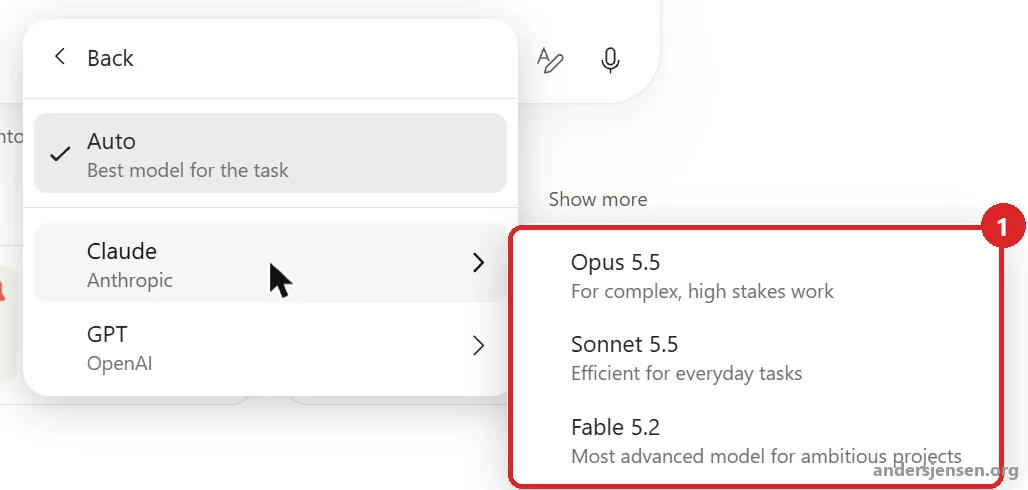
- Opus 5.5: "For complex, high stakes work".
- Sonnet 5.5: "Efficient for everyday tasks".
- Fable 5.2: "Most advanced model for ambitious projects".
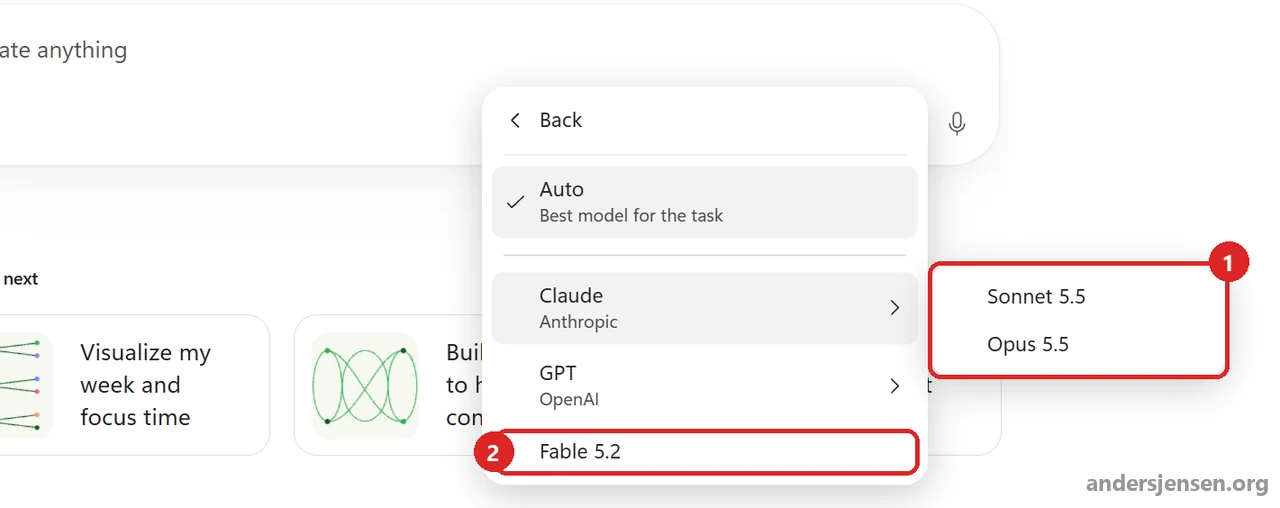
Fable 5.2 was announced on November 11 for Cowork and Copilot Studio, and it already appears in both Cowork and Code for us. Microsoft does not say clearly whether Fable 5.2 runs under Microsoft's terms or as one of the Data Retention models I describe below. We saw no label in the picker, but check before you use it with confidential data.
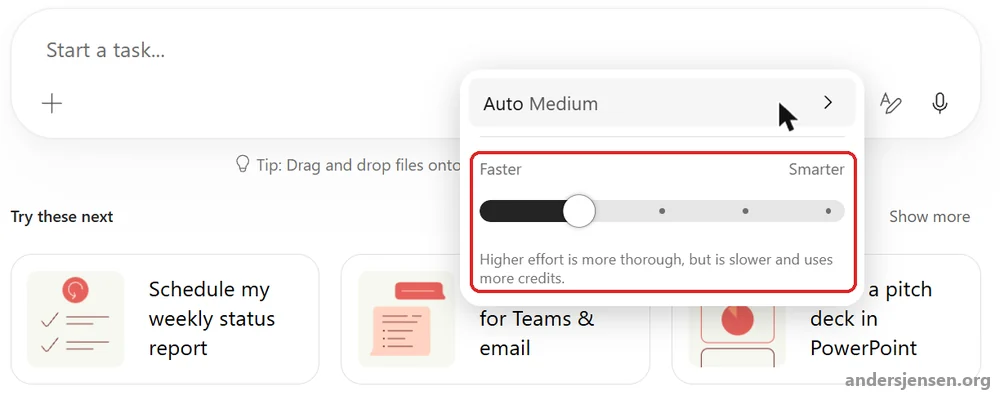
Cowork is billed by usage in Copilot Credits. Next to the model choice is a slider between "Faster" and "Smarter", and the text below it says that higher effort is more thorough, but slower and uses more credits.
How to give a pilot group access and cap the spending is covered in the guide to Copilot Cowork access with a pilot group.
One caveat about Cowork: At the time of writing, Microsoft's Cowork documentation says that organisations within the EU Data Boundary can only use GPT models. In our Danish tenant, the Claude models still appear in the picker. Check what you see yourself.
Claude or GPT: Which should you choose?
Short answer: Leave "Auto" as the default, and choose a model on purpose when you have a reason. Microsoft's router is built to pick a suitable model for each task, and most employees do not need to think about it. What makes the biggest difference is still how people use Copilot in Word, Excel, PowerPoint, Outlook and Teams, which is what we practise in our Microsoft Copilot beginners course.
If you have a reason, test the same prompt on both model families before you make it a habit. Researcher's Model Council does exactly that for you. And keep the limits in mind:
- Opus has a usage cap. Microsoft says Opus is included in the licence "with limits", but the numbers are not published.
- The choice resets in Office. In Word, Excel and PowerPoint, you have to choose Claude again for each session.
- Copilot's rules still apply. When Anthropic is used as a Microsoft subprocessor, Microsoft's access controls and Enterprise Data Protection apply. Models labelled "Anthropic models with Data Retention" have separate terms (more on those below). In the Word, Excel and PowerPoint agents, Microsoft does the searching in your data, and only the relevant context is passed on to the model.
Licence and price
- Copilot Chat and Researcher: Microsoft documents Claude for users with a Microsoft 365 Copilot licence and requires a Copilot licence for model choice in Researcher. This guide shows users with the paid licence.
- The Word, Excel and PowerPoint agents: Require the paid licence, according to Microsoft.
- Model choice in Word and PowerPoint: Requires a paid Copilot subscription, according to Microsoft. For Excel the documentation is not clear, but this guide shows the paid setup.
- Included in the licence: Microsoft's overview of licensing and usage-based billing lists Sonnet as included under fair use and Opus as included within limits.
- Billed in Copilot Credits: The same overview places Cowork, Code and newer agentic frontier models such as Fable under usage-based billing. This requires a user licence and a billing policy set up by an admin.
- No contract with Anthropic: Except for the Data Retention models below, you do not sign anything with Anthropic. It all goes through Microsoft.
Microsoft's documentation does not say clearly whether users without the paid licence can see any Claude model. This guide shows the paid setup.
Data and the EU Data Boundary: What your DPO needs to know
This is where most organisations need to spend time, and it is where Microsoft is moving the pieces right now.
Anthropic is a Microsoft subprocessor
Since January 7, 2026, Anthropic has been a Microsoft subprocessor. That means the Microsoft Product Terms, Data Protection Addendum and Enterprise Data Protection apply when you use Claude in Copilot with Anthropic as a subprocessor. Your prompts and responses are not used to train the models, and Microsoft's Customer Copyright Commitment also applies.
The exception: Models with Data Retention
Some of Anthropic's newest models are only offered as "Anthropic models with Data Retention", for example Claude Fable 5 and Mythos 5. Here, Anthropic is an independent processor, and Anthropic's own terms apply, not Microsoft's.
According to Microsoft, Anthropic keeps most inputs and outputs from these models for up to 30 days. Content flagged as a possible breach of Anthropic's policies can be kept for up to 2 years, and classifier scores for up to 7 years. The data is not used for training without your explicit permission. These models have their own switch, which according to Microsoft is off by default in all regions.
Check it anyway: In our own tenant, the switch was set to "All users". Step 3 of the admin guide below shows where to find it.
Today: Claude is outside the EU Data Boundary
Until early December 2026, Claude is not covered by Microsoft's commitment to processing within the EU Data Boundary. Microsoft says so both in its documentation and in MC1546438.
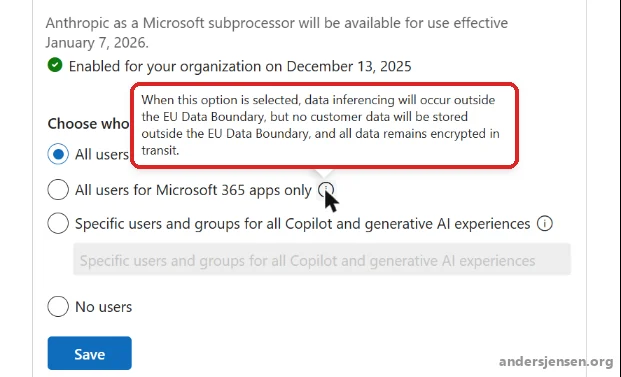
Our admin center also shows what this means for one of the options: If you choose "All users for Microsoft 365 apps only", processing happens outside the EU Data Boundary, but no customer data is stored outside it, and everything is encrypted in transit.
From December: Claude moves into the EU Data Boundary
This is the most important change for Claude in Europe going forward. Microsoft's Message Center post MC1546438 from November 10 describes the timeline for EU and EFTA tenants that are eligible for the EU Data Boundary:
- Early December 2026: Processing for Claude in Copilot moves into the EU Data Boundary. If you already use Claude, this happens automatically once it is ready.
- December 9, 2026: Microsoft turns Claude on for all users in tenants that have not made a selection for Anthropic.
- The same day, the option "All users for Microsoft 365 apps only" is retired, and tenants using it move to "All users".
- Your other choices are respected, and you can turn Claude off or limit access at any time.
- The Data Retention models are governed by a separate setting and are not part of the change.
The post requires you to sign in to the admin center, but the link above goes straight to it. Microsoft also describes the move in a public blog post from November 5. At the time of writing, Microsoft's documentation had not been updated with the change and still says that Claude is outside the EU Data Boundary.
What Microsoft has not answered yet
- Denmark or the EU: Nothing says whether processing happens in Denmark or just within the EU, or on whose infrastructure.
- Copilot Studio and Power Platform: The post gives users Claude in Copilot Studio, but Microsoft does not confirm that the same data location applies there. At the time of writing, Copilot Studio marks the Claude models as "cross-geo" in Europe.
- Multi-Geo: According to Microsoft, Multi-Geo customers are not covered by the EU Data Boundary, even when the tenant is in an EU country.
Other models in Microsoft 365: Mistral AI
Claude and GPT are not the only providers the admin center knows. Under the same settings, you can also allow Mistral AI. Like the Data Retention models, Mistral runs as an independent processor under the provider's own terms. So Microsoft's DPA and data location commitments do not apply to Mistral. According to Microsoft, at the time of writing Mistral is only available as an experimental model in Copilot Studio.
Two more things for regulated industries
- No PCI DSS coverage: According to Microsoft, PCI DSS coverage does not include Anthropic's models in Copilot Studio when they store, process or transmit card data. My recommendation is to keep card data out of those agents.
- Flex routing: Under the same Copilot settings is "Flex routing during peak load periods". It controls whether Copilot may process some requests outside the EU Data Boundary at peak demand. According to the panel, data at rest stays in the EU, except for limited pseudonymised data for security and operations. According to Microsoft, it is on by default for tenants created after March 25, 2026. Ours is set to "Do not allow flex routing".
Admin guide: How to control Claude in the Microsoft 365 admin center
Access to Claude is controlled separately from the agent registry, blocking and rollout covered in our guide to managing agents in Microsoft 365 Copilot. Here is where to find the Claude setting.
What you need
- The AI Administrator or Global Administrator role in the Microsoft 365 admin center.
- Microsoft 365 Copilot licences for the users who should have Claude.
- An Entra ID security group, if you want to start with a pilot group.
Step 1: Find the setting
- Open the Microsoft 365 admin center.
- Select "Copilot" and then "Settings" in the left menu.
- Select the "View all" tab, and search for "AI providers".
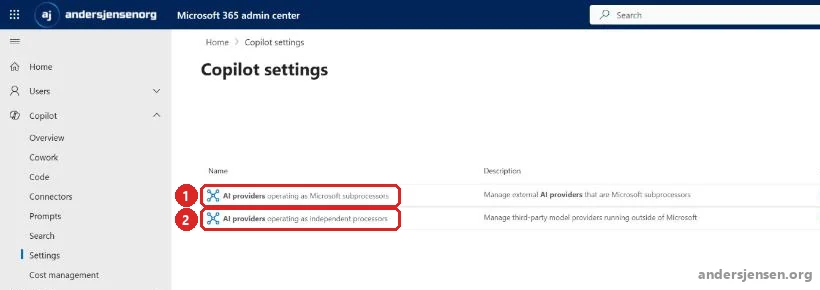
The search returns two settings, and the difference is the whole point of the data section:
- AI providers operating as Microsoft subprocessors: Claude under Microsoft's terms. This is the one most organisations need.
- AI providers operating as independent processors: Models under the provider's own terms, for example Anthropic's Data Retention models.
Step 2: Choose who can use Claude
- Click "AI providers operating as Microsoft subprocessors".
- Expand "Anthropic" under "Available subprocessors for your organization".
- Choose one of the four options under "Choose who can use models operated by Anthropic".
- If you chose "Specific users and groups", search in the box below the option for the users or security groups that should have access, and add them.
- Click "Save".
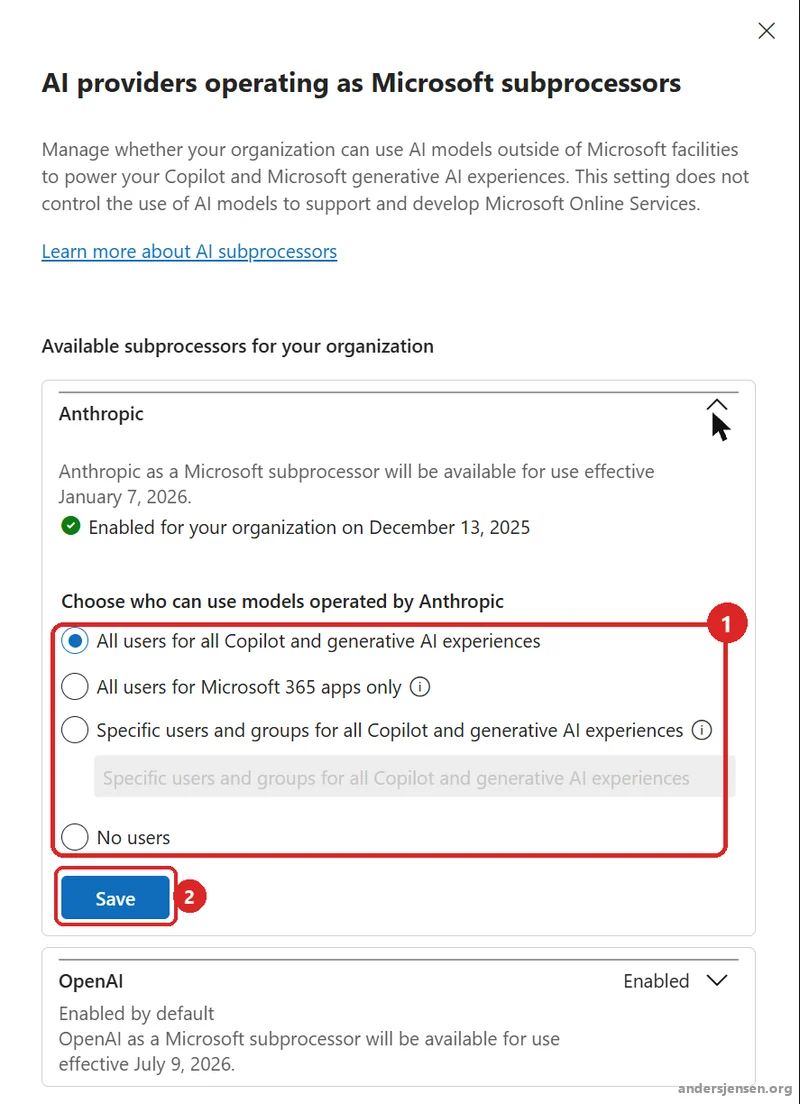
The four options mean:
- All users for all Copilot and generative AI experiences: Anthropic is allowed for everyone at the provider level. Licence, billing policy and Power Platform settings still apply. This is the option tenants without a selection get on December 9.
- All users for Microsoft 365 apps only: Claude only in Word, Excel and PowerPoint. This option is retired on December 9.
- Specific users and groups for all Copilot and generative AI experiences: Only the users and groups you add. This is the pilot group option.
- No users: Nobody has access to Anthropic as a Microsoft subprocessor. The Data Retention models are controlled in the separate setting in step 3.
The choice in this panel applies to Anthropic as a provider, not to individual models, so you cannot allow Sonnet and block Opus here. You can add up to 999 users and groups in total, and nested groups work.
Microsoft does not document how long a change takes to apply. Give it time before you conclude that it does not work.
Step 3: Check the switch for Data Retention models
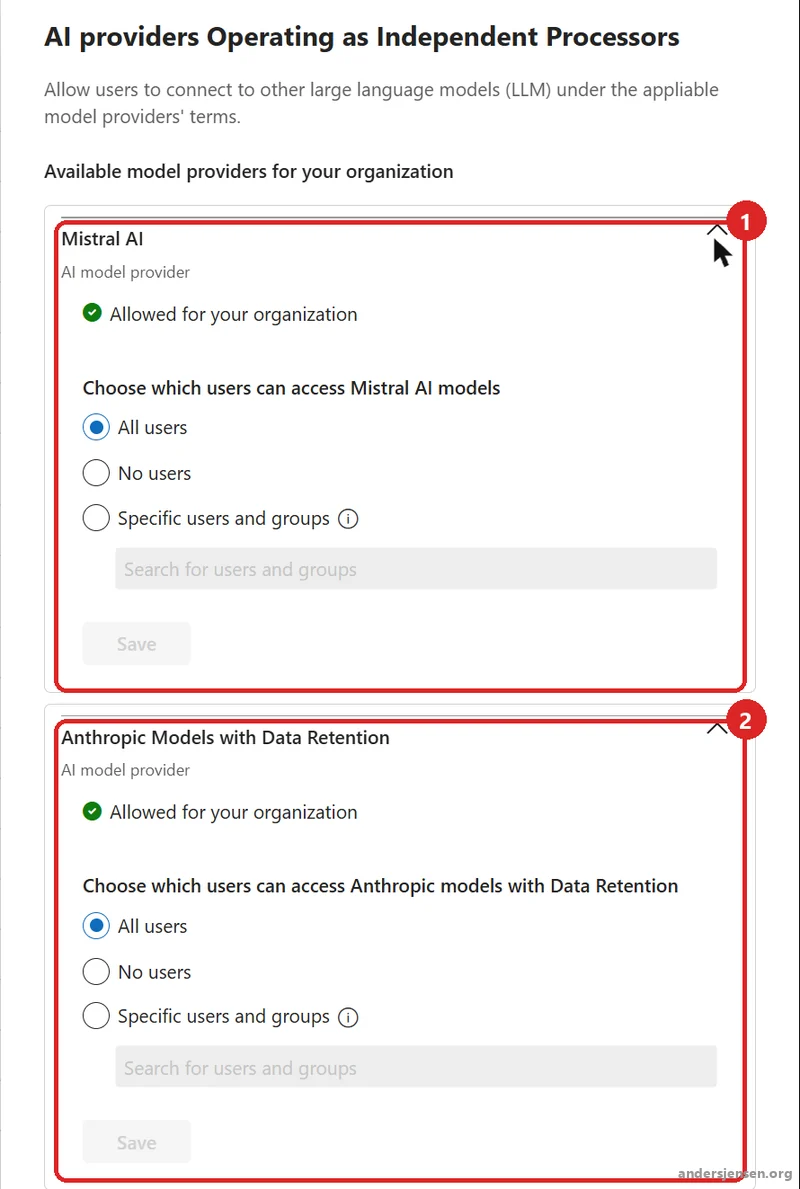
- Go back to the search, and click "AI providers operating as independent processors".
- Expand "Anthropic Models with Data Retention". Choose "No users" unless your legal team has accepted Anthropic's terms, and click "Save" under that provider.
- Expand "Mistral AI", if it is on the list. Choose who can use the models based on your decision about Mistral's terms, and click the separate "Save" button under Mistral AI if you change the choice.
Step 4: Remember Copilot Studio
If your makers should use Claude in agents in Copilot Studio, the admin center is only half of it. According to Microsoft, you also need to:
- Have a Power Platform administrator open the Power Platform admin center.
- Allow Anthropic, either per environment under "Enable External Models" or per environment group with the rule "Power Platform Anthropic".
- Follow the exact steps in Microsoft's guide to external models in Power Platform.
Microsoft says it can take a few hours from Anthropic being turned on in Microsoft 365 until the setting appears in Power Platform. Also note that the Claude models in Copilot Studio are marked "cross-geo" in Europe. If the environment does not allow data movement across regions, the model may be unavailable when the agent runs, according to Microsoft. That is a decision about data location, so make it on purpose, and do not open up data movement just to make it work.
What agents cost when they run is covered in the article on Copilot Studio pricing.
Verify: See it through the user's eyes
If you chose a pilot group:
- Sign in as a user in the group with a Copilot licence, and open Copilot Chat.
- Click "Auto", choose a Claude model, and send a prompt.
- Confirm that you get an answer and that the button at the top shows the Claude model.
- Sign in as a similar user outside the group, and confirm that Claude cannot be chosen.
If you chose "All users for Microsoft 365 apps only":
- Open a document in Word, Excel or PowerPoint as a user with a Copilot licence.
- Open the Copilot pane, and confirm that Claude can be chosen in the model picker.
If you chose "No users":
- Sign in as a user with a Copilot licence, and open Copilot Chat.
- Click "Auto", and confirm that the Claude models under Microsoft's terms cannot be chosen.
- Check the setting in step 3 if you also want to decide whether Data Retention models are available.
Common pitfalls
- Letting the deadline pass. If you never made a choice, Claude is on for everyone from December 9. The decision is made for you.
- Thinking "Microsoft 365 apps only" is a safe choice. The option is retired on December 9, and you move to "All users" without the limit you chose.
- Mixing up the two settings. "Subprocessors" means Microsoft's terms. "Independent processors" means the provider's terms. The second setting needs its own decision.
- Forgetting Copilot Studio. Without the Power Platform setting, makers cannot use Claude, even though users in Copilot can.
- Trusting the documentation blindly. At the time of writing, Microsoft's own pages contradict each other on the EU, Cowork and defaults. Check your own tenant.
Our recommendation: Decide before December 9
Claude in Copilot is good news. Choice between models makes Copilot better, and Researcher's combination of GPT and Claude is one of the most interesting things Microsoft has built into Copilot this year. Decide actively who should have access before the default changes.
So our recommendation for most organisations is: Go to the admin center now and see what you are set to. Choose "Specific users and groups" with a pilot group if you are not ready for everyone.
At the same time, update your data protection impact assessment (DPIA) and records of processing with Anthropic as a subprocessor and the move into the EU Data Boundary. Keep the switch for Data Retention models off until your legal team has read Anthropic's terms.
Also put a reminder in your calendar for early December, so you can see whether Microsoft delivers what it has promised. We have Claude on for all users, but in an organisation our size, the pilot group and the whole organisation are almost the same thing.
Frequently asked questions
Does Claude cost extra in Microsoft 365 Copilot?
Not in Copilot Chat, Researcher, Word, Excel and PowerPoint, if the user has a paid Microsoft 365 Copilot licence. Microsoft says Sonnet is included under fair use and Opus within limits it has not published. Cowork, Code and the newest frontier models such as Fable are billed in Copilot Credits.
Is our data used to train Claude?
No. With Anthropic as a Microsoft subprocessor, the Microsoft Product Terms, DPA and Enterprise Data Protection apply, and prompts and responses are not used to train the models. Models labelled "Anthropic models with Data Retention" run under Anthropic's own terms instead. There, Anthropic keeps most data for up to 30 days, flagged content for up to 2 years and classifier scores for up to 7 years, and according to Microsoft the data is not used for training without your explicit permission. Those models have their own switch, which is off by default.
What happens to Claude on December 9, 2026?
According to Microsoft's Message Center post MC1546438, Microsoft turns Claude on for all users in EU and EFTA tenants that are eligible for the EU Data Boundary and have not made a selection for Anthropic. The option "All users for Microsoft 365 apps only" is retired the same day, and tenants using it move to "All users". In early December, processing for Claude moves into the EU Data Boundary.
Can we turn Claude on for only some users?
Yes. In the Microsoft 365 admin center, choose "Specific users and groups" under Anthropic and add users or Entra ID security groups, up to 999 in total. The choice applies to Anthropic as a provider, not to individual models.
Who can change the Claude setting?
An AI Administrator or Global Administrator in the Microsoft 365 admin center. If Claude should also be used in Copilot Studio, a Power Platform administrator must allow it per environment or environment group in the Power Platform admin center.
You can find Microsoft's official documentation here: Claude models from Anthropic in Microsoft Online Services. The December 9 change is in the Message Center post MC1546438.
Microsoft is moving fast in this area, and December 9 is unlikely to be the last change. Follow me on LinkedIn for regular updates on what changes in Copilot.